It's been a long time since I've been blogging on any of my blog pages.
So, now that I've been at it again on the BASIC Programming blog, I posted the following information below when someone inquired about Run BASIC, so it only makes sense to post it here also.
The essential concept of Run BASIC that it is an all-in-one BASIC web application server. You can use it to create a dynamic web site, or to host in-house applications for your business or school, or use it to control your home. The possibilities are pretty much endless.
Here is a link to a white paper about Run BASIC.
http://www.libertybasic.com/RunBASICBreakthrough.pdf
Here is a link to the Run BASIC community forum.
http://runbasic.proboards.com/
Showing posts with label runbasic. Show all posts
Showing posts with label runbasic. Show all posts
Friday, January 8, 2016

Monday, January 5, 2009
Drawing Graphics - Lesson 4
Drawing graphics is a powerful and fun feature of programming languages, and Run BASIC makes it easy to do this in a web application.
To do this we use the GRAPHIC statement to create a graphical object. Then we call methods on that object. The term 'method' is another way of saying a function that is tied to a kind of object. Once we've drawn something we can tell Run BASIC to embed the graphic into the web page by using the RENDER statement.
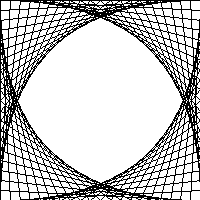
Here is a very simple Run BASIC program that draws a graphic.
Next lesson we will add a graphical drawing to our hypotenuse calculator.
To do this we use the GRAPHIC statement to create a graphical object. Then we call methods on that object. The term 'method' is another way of saying a function that is tied to a kind of object. Once we've drawn something we can tell Run BASIC to embed the graphic into the web page by using the RENDER statement.
Here is a very simple Run BASIC program that draws a graphic.
'draw a graphic 200 by 200
graphic #pattern, 200, 200
for x = 0 to 200 step 10
#pattern line(x, 0, 0, 200-x)
#pattern line(0, x, x, 200)
#pattern line(x, 0, 200, x)
#pattern line(x, 200, 200, 200-x)
next x
render #pattern
end
Here is what the drawn graphic looks like!

Next lesson we will add a graphical drawing to our hypotenuse calculator.
Subscribe to:
Posts (Atom)
